
Glyde vs Loom
Loom is a great async video tool. Glyde turns those same recordings into scannable, searchable step-by-step SOPs — and can import your existing Loom library to do it.
The short version
Loom is excellent for quick, personal async video — hit record, talk over your screen with face-cam, drop the link in a message, and move on. The trade-off is the format: a video makes viewers watch, scrub, and hunt for the one step they actually need, and it can't be skimmed, searched, or copied from. Glyde's multimodal AI pipeline turns a recording into a structured SOP — purpose, scope, prerequisites, and annotated steps — that a new hire can read on day one, and Guide Me overlays it as a live in-browser walkthrough. You don't have to choose: paste a Loom link or batch-import up to 500 recordings and Glyde generates an SOP from each. If your job is fast async video updates, Loom is the right tool. If your job is documentation people can follow and find, Glyde is the stronger fit.
Glyde vs Loom, feature by feature
| Feature | Glyde | Loom |
|---|---|---|
| Primary output | Structured SOP (purpose, scope, steps) | Screen-recorded video |
| Scannable / skimmable | Watch to find a step | |
| Full-text searchable content | Transcript search | |
| AI-written step context | What, why, and where it fits | |
| Import / upload existing video | Loom + file upload (up to 500) | Native library |
| Turn a Loom library into SOPs | ||
| Interactive in-browser walkthroughs | Guide Me, all plans | |
| Face-cam / talking-head recording | ||
| PII redaction / auto-blur | On-device, all plans | Paid plans |
| PDF export | Free plan | |
| Copy / paste steps into a wiki | ||
| Free plan | 3 guide creations in total | Video limits per plan |
What you get with Glyde
Real SOPs, not a list of clicks
Glyde's multimodal AI reads DOM state, structured step data, screenshots, and optional voice narration to write documentation with purpose, scope, prerequisites, and annotated steps — what you did, why it matters, and where it fits. The output reads like a guide a new hire can follow on day one, not a screenshot dump captioned “Click the button.”
Turn existing recordings into SOPs
Already have a library of Loom or screen recordings? Paste a Loom link, upload your own video files, or batch-import up to 500 recordings at once — Glyde generates a structured SOP from each. You don't have to re-perform every process live just to document it.
Guide Me turns any SOP into a live walkthrough
Glyde overlays step-by-step guidance directly in the browser — highlighting where to click, what to enter, and when to proceed. Your documentation becomes an interactive co-pilot, not a static page someone has to read in another tab.
PII redaction on every plan
SmartBlur auto-detects and masks passwords, emails, phone numbers, and credit cards on-device before anything leaves your browser. It's included on the free plan — not gated behind an Enterprise tier.
Not just steps. Real SOPs.
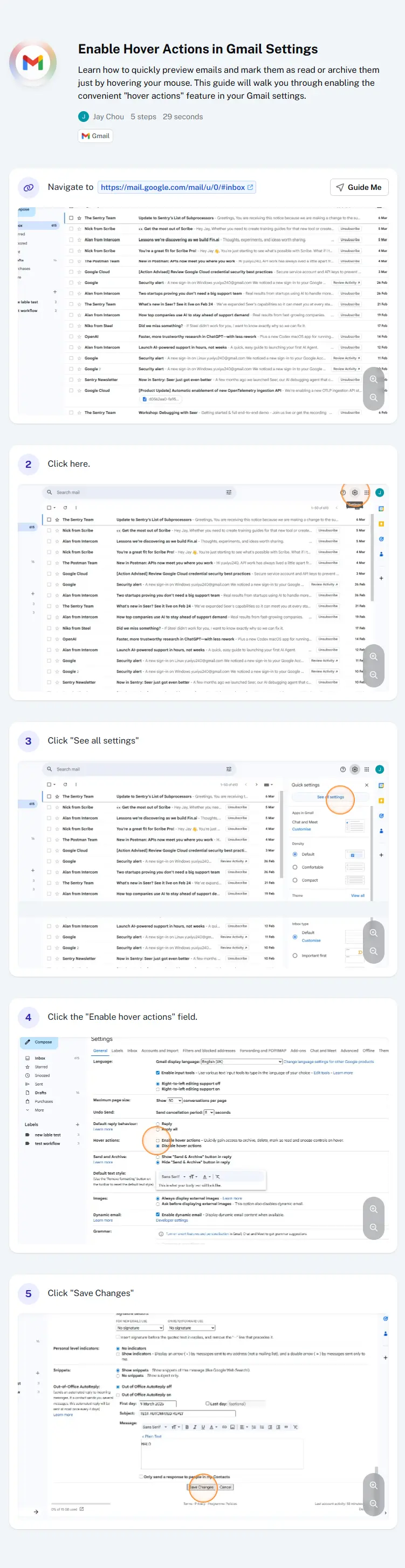
Other tools give you a list of clicks. Glyde generates structured, professional documentation your team can actually follow.

Scroll to compare.
When Loom is the better choice
No tool is right for everyone. Loom is a solid pick when:
- You want the fastest way to send a quick, personal async video update with face-cam.
- The message is the point — a casual walkthrough, feedback clip, or explanation you'd otherwise say on a call.
- Your audience would rather watch a short video than read a document.
- You're sharing something conversational and one-off, not building a documentation library.
Otherwise — if the goal is documentation your team actually follows — give Glyde a try. You can also see how Loom describes itself on its own site.
Glyde vs Loom, answered
Is Glyde a good Loom alternative?
What's the main difference between Glyde and Loom?
Can Glyde turn my existing Loom videos into documentation?
Is there a free Loom alternative?
Does Glyde do face-cam video like Loom?
More on Loom and the alternatives
Turn your next recording into a real SOP
Record once, get documentation your team can follow on day one. Free plan, no credit card required.
Try Glyde Free